Valve’s Proton upgrade matters more than it looks
Valve’s Proton upgrade is about one simple thing: making Windows games run better outside Windows. That means smoother, more consistent frame rates, better PC game emulation on Linux and Android, and a stronger path forward for Proton, Linux, and Valve’s gaming ecosystem in 2026. If you game on Linux, use SteamOS, follow Bazzite Linux gets some major upgrades for the April 2026 Update news, or just want to game on Linux from a handheld, this is the kind of update worth watching.
Android Authority reports that Valve has released Proton 11 beta, and the big headline is not just Linux support. The update also adds an ARM64 profile, which could help run x86 PC games on Arm-based devices such as Android phones, tablets, gaming handhelds, and Arm Windows PCs. That is a big reason people are paying attention.
What Proton is and why it matters for Linux gaming
If you are new to this, Proton is Valve’s compatibility layer for running many Windows games and apps on Linux. In plain English, it helps you buy a game on Steam and play it on a Linux-based system without waiting for a native Linux port.
That matters because Linux gaming used to be limited. According to GamingOnLinux, Proton has changed that over the last seven years. The site says at least 15,855 games are rated playable on ProtonDB with at least two reports, while 21,694 games on Valve’s Deck Verified system are rated at least playable. Those numbers do not mean every game works perfectly, but they show how far things have come.
This is why many Linux users say Proton is great. There are plenty of native games now built for Linux, but Proton fills the gap for the huge Windows catalog. It lets you keep the same Steam library instead of buying games again on another platform.
What changed in Proton 11 beta
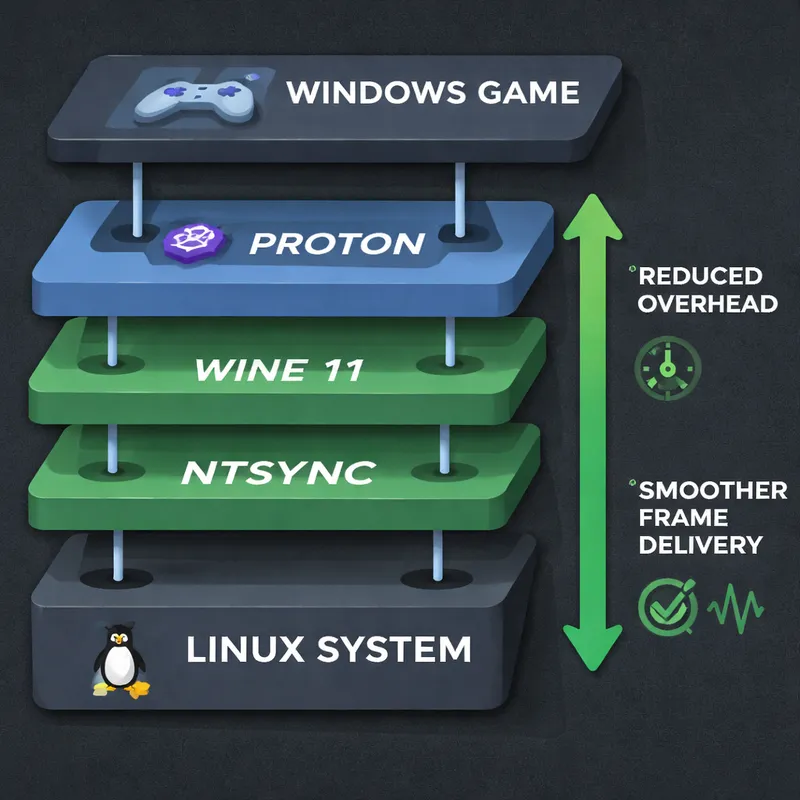
The newest Steam Proton version is based on the latest Wine work, and that is where the performance gains start.
According to Android Authority, Proton 11 beta brings:
- Performance improvements from being based on the latest Wine
- Wine 11 support, including NTSync
- Reduced system overhead when running Windows games on Linux
- Better hardware support for titles that already worked
- Support for new games
- Dozens of bug fixes for older issues
The NTSync detail is especially important. Android Authority says Wine 11 added support for NTSync last month, and that helps reduce overhead. In practice, lower overhead can mean smoother play and more consistent frame rates, especially in games that are sensitive to synchronization and CPU scheduling.
No hard benchmark numbers were provided in the source material, so it is smarter to treat this as a technical upgrade with promising real-world benefits rather than a guaranteed FPS jump in every game.
New games supported by Valve’s Proton 11 beta
One thing Valve’s updates often do well is expand compatibility. Android Authority says Proton 11 beta adds or formalizes support for several titles, including:
- Universe Generator: The Golden Sword
- DCS World Steam Edition
- Resident Evil (1996)
- Resident Evil 2 (1998)
- Dino Crisis
- Dino Crisis 2
- From Dust
- Blaite
- Don’t Die Dateless, Dummy!
- METAL GEAR SURVIVE
- Warhammer: Vermintide 2
- Metal Fatigue
- SHOGUN: Total War
- Unknown Faces
- Gothic 1 Classic
- X-Plane 12
- Breath of Fire IV
- Deadly Premonition
Some of these games were already playable in Proton Experimental, while others were added with this update. That is worth noting if you already use Proton Experimental download builds to test newer fixes before they reach a broader stable release.
If you have ever asked whether Valve's Proton 10.0-4 update introduces a new wave of games to Linux or whether newer releases still matter, this is your answer. Each major Proton release keeps widening the pool of games that just work or work better.
Why Android gamers should care
This is the part that makes the story bigger than a normal Linux update.
Android Authority says Valve is adding a Proton 11 profile for ARM64 devices. That profile is aimed at helping emulate x86-designed games on Arm chips. Since many Android devices use Arm processors, this could improve PC gaming on Android hardware, especially in handheld setups that already rely on PC emulation tools such as GameHub.
That does not mean your average Android phone suddenly becomes a full Steam Deck overnight. Hardware limits still matter. Cooling matters. Driver quality matters. Controls matter. But the direction is clear: the software stack for running PC games on Arm devices is getting better.
This is also relevant beyond Android. Arm-based Windows PCs could benefit too, because the same core problem exists there: a lot of PC games were built for x86 hardware.

How this fits into the bigger Linux and SteamOS picture
Valve has been building toward this for years. SteamOS is Valve’s Linux-based operating system, and it is designed around gaming first. That makes Proton central to Valve’s strategy, not just a side project.
GamingOnLinux argues that Proton helped move Linux gaming from a niche hobby into something much more practical. The site also says Linux usage on Steam is getting close to 3%, which is still small next to Windows but much better than many people expected years ago.
That growth matters because better compatibility creates a feedback loop:
- More games work on Linux
- More people try Linux gaming
- More handhelds and Linux-based devices make sense
- Valve has more reason to keep improving Proton and SteamOS
You can see why users of Steam Deck, SteamOS, and even projects like Gaming on Rocky Linux or community distros pay attention to these updates. A better Proton helps the whole stack.
There are still limits, of course. GamingOnLinux notes that some games can still run into issues such as kernel-level anti-cheat or odd video codec problems. Proton is strong, but it is not magic.
How to run games with Proton
If you want to try it yourself, the process is usually simple:
- Install Steam on your Linux PC or Linux-based handheld.
- Open Steam settings.
- Go to Compatibility.
- Enable Steam Play for supported titles, or all titles if you want broader testing.
- Choose a Steam Proton version.
- Launch your game and test.
If a title does not work well on the default release, many users try Proton Experimental next. That is often where newer fixes show up first. You can also check community reports on ProtonDB to see what settings other players used.
For advanced users, Valve documents Proton changes on GitHub, which Android Authority says is where this update was detailed. If you like tracking bug fixes, compatibility notes, or Proton EM GitHub discussions, that is a good place to watch.
How good is Proton on Linux right now?
Honestly, it is good enough that Linux gaming is normal for many people now.
That does not mean every single multiplayer game works. It does not mean you will never tweak anything. But compared with where Linux gaming stood years ago, Proton has made a huge difference. Reddit users in r/linux_gaming summed that up pretty well, calling Proton an incredible game-changer for Linux after seven years.
If your goal is to game on Linux without giving up your PC library, Proton is one of the main reasons that is realistic in 2026.
What this update could mean next
The ARM64 profile is the most forward-looking part of the news.
If Valve keeps improving Proton on Arm, a few things become more plausible:
- Better PC-style gaming on Android handhelds
- Better support for Arm-based Windows devices
- More interest in portable Linux and Android gaming hardware
- A wider future for Valve binaries Linux support and Proton OS for PC style experiences through SteamOS-like systems
Android Authority also mentions reports that Proton is helping Steam run on devices that are not officially supported, including claims involving the Nintendo Switch. That should be treated as a sign of experimentation rather than official support, but it shows how much curiosity there is around Proton’s reach.
FAQ
Do 72% of devs think Steam is a monopoly?
According to the Google People Also Ask summary you provided, 72% of developers believe Steam has a monopoly on the PC games market, and more than half feel they rely too heavily on Steam for distribution. Since that figure comes from a referenced study summary rather than the Proton source articles here, it is best to present it as a reported claim from that study.
What is Proton for gaming?
Proton is Valve’s compatibility layer that helps many Windows games run on Linux. It is a key reason you can use Steam on Linux-based systems like SteamOS and play a large chunk of the Windows PC catalog without needing native Linux ports.
Is Valve welcoming Android games into Steam?
Based on the People Also Ask summary you supplied, Valve has said Steam Frame will support Android apps through a translation layer. It also suggests that if a developer already has a mobile-optimized version, uploading the Android version could make more sense than rebuilding for x86 and Proton. That is separate from Proton 11 beta news, but it points to Valve’s broader interest in translation layers and flexible game delivery.
What is a Linux Valve?
Valve’s Linux-based platform is SteamOS. It is designed to offer a gaming-focused user experience while keeping the flexibility of a PC. In practice, SteamOS and Proton work together to make Linux gaming much easier than it used to be.
Final thoughts
Valve’s Proton 11 beta is not just another patch note drop. It is an upgrade that improves the core idea behind modern Linux gaming: play more PC games, with less friction, on more kinds of hardware.
The Linux side of the story is already strong. The Android and ARM64 angle is what makes this release especially interesting. If Valve keeps pushing here, your next portable PC gaming device may not need to look like a traditional PC at all.

