Microsoft Edge Canary restores YouTube background play
Microsoft Edge Found a Way to Play YouTube in the Background—Even Without Premium, and that is why so many mobile users are suddenly paying attention to Edge Canary. If you use YouTube for music, podcasts, long interviews, or study videos, background playback matters a lot. You want the audio to keep going while you switch tabs, lock your screen, or answer a message.
That feature has usually been tied to YouTube Premium, which now costs around $16 per month in some reports. At the same time, users have also complained about stricter limits on non-Premium viewing, including blocked background play on third-party mobile browsers and a tougher stance on ad blocking.
Now, reports from Windows Central, Yahoo Tech, PCWorld, and BGR point to a workaround inside Microsoft Edge Canary. It is not the stable version of Edge yet, but it does suggest Microsoft has restored YouTube background play for some mobile users.

What changed with YouTube background play?
For a while, many users relied on mobile browsers to keep YouTube playing in the background. Then that started to break. Reports and user posts said YouTube background playback through many browsers was being shut down or limited unless you paid for Premium.
That matters because background audio is not some niche feature. A lot of people use YouTube more like Spotify or a podcast app than a video app. You start a video essay, switch apps, and keep listening. Simple.
Google's position has been fairly clear: background play is mainly a YouTube Premium feature, especially on mobile. Some reports also noted other pressure tactics around non-Premium use, such as throttling videos with certain ad blockers or making parts of the experience worse.
So when Microsoft Edge Canary showed a way around that limit, it immediately stood out.
What is Microsoft Edge Canary, and why are people talking about it?
Microsoft Edge Canary is the experimental version of Edge. Think of it as the test lab. Microsoft rolls out unfinished browser features there first, and some of them later reach the normal Edge app.
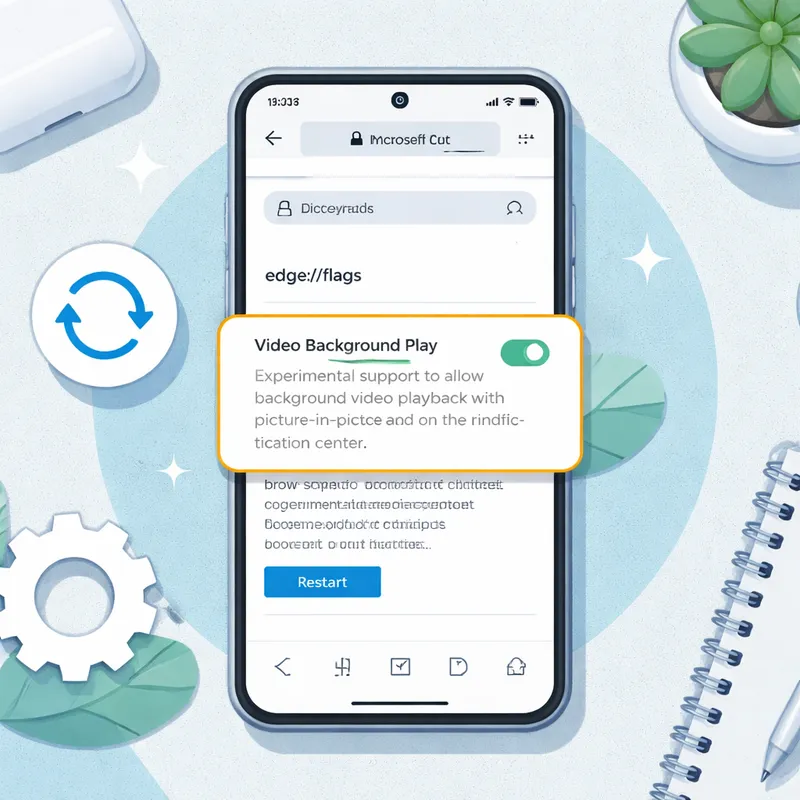
In this case, the feature getting all the attention is a flag called Video Background Play. According to the coverage, enabling this flag in Edge Canary on Android can let YouTube audio continue playing in the background without a Premium subscription.
The discovery was first highlighted by Leo Varela, also known as Leopeva64, on X. That gave the story momentum because it was not just a rumor. People could actually try the setting.
There were also a few extra Edge Canary features mentioned in the same wave of reports:
- Audio indicators on tab cards in the tab switcher
- A mute or unmute option in the tab context menu
- Early signs that Microsoft is improving media controls in mobile Edge
One small catch: the mute toggle reportedly was not working properly yet. That is normal for Canary. Experimental builds can crash, break, or behave differently from one device to another.
How to play YouTube in background in Microsoft Edge
If you want to test it yourself, the process is pretty simple on Android.
Step-by-step setup
- Download Microsoft Edge Canary on your Android phone.
- Open the address bar and type edge://flags.
- Search for Video Background Play.
- Set the flag to Enabled.
- Restart the browser.
- After restart, open Edge Canary settings.
- Go to Settings > Site settings > Background video playback.
- Make sure that option is turned on.
- Open YouTube in Edge Canary and start a video.
- Switch to another tab or app and check whether the audio continues.
That is the basic answer to the People Also Ask query about how to play YouTube in background in Microsoft Edge: enter edge://flags, enable the feature, and restart your browser.
Some reports also mentioned a prompt in Edge Canary that says something like, “Turn on Ad blocker to watch videos without interrupting ads.” If you see that, remember this is where things get messy. Blocking ads may affect creator revenue, and YouTube may react to these workarounds over time.
Does it work on Android and iPhone?
Right now, Android looks like the safer bet.
Several reports say the background playback experience appeared in Edge Canary on Android through a flag that arrived around August of the previous year. That lines up with the Android-focused walkthroughs showing the feature in action.
iPhone support is much less clear. At least one report suggested the feature might not be available in Edge Canary for iOS. That would not be shocking. Apple places tighter limits on browser engines and browser behavior, so feature parity often lags behind Android.
If you are on Android, you have a real shot at using this today. If you are on iPhone, you may need to wait or test carefully.
Is this a free alternative to YouTube Premium?
Sort of, but not fully.
If your main goal is simple background audio, then Edge Canary can feel like a free alternative to YouTube Premium. You open a YouTube video, move away from the tab, and keep listening. For many people, that is the one Premium feature they actually care about.
But this is not a full replacement. You still may miss:
- YouTube Music benefits
- Offline downloads
- The smoother in-app Premium experience
- Better consistency across devices
So if you are asking, “Is there a free alternative to YouTube Premium?” the honest answer is yes, for some background playback use cases, but not for the entire package.
Also, keep in mind that this workaround depends on an experimental browser build. That means it can disappear, change, or stop working after an update.
Edge Canary YouTube background not working? Try these fixes
If Edge Canary background Play is not working for you, try these quick fixes:
1. Make sure you are using Edge Canary, not regular Edge
The feature has been tied to Microsoft Edge Canary, not the standard stable Edge app.
2. Recheck the flag
Go back to edge://flags and confirm that Video Background Play is still enabled.
3. Restart the browser fully
Do not just switch tabs. Close Edge Canary and reopen it.
4. Turn on the site setting
In some reports, the flag alone was not enough. You also had to enable Background video playback under site settings.
5. Test with another media site
BGR noted that this may work beyond YouTube on sites with embedded media players. Testing another site can help you figure out whether the issue is YouTube-specific.
6. Update the app
Canary changes fast. An old build may behave differently from a newer one.
7. Expect bugs
This is the least fun answer, but it is the most realistic one. Canary builds can break. If the feature worked yesterday and fails today, that may be the reason.
How this compares with Brave and other browsers
Microsoft is not the first browser maker to flirt with YouTube workarounds. PCWorld noted that browsers like Brave and Samsung Internet have also supported background video playback in some form.
That is why related searches like Brave YouTube not playing in background keep popping up. Users are clearly hunting for a browser that lets them treat YouTube like an audio app without paying a monthly fee.
What makes Edge interesting is the timing. YouTube's Premium crack down has made background playback more valuable, and Microsoft Edge has launched features that bypass YouTube Premium's paywall in a way that feels more visible than usual. If Microsoft brings this to stable Edge, that could become a real reason for some people to leave Chrome.
I would not call it a browser war moment just yet, but it is enough to make people look twice at Microsoft Edge - YouTube support on mobile.
Will this come to the stable Edge app?
That is the big question.
As of 2026, there is still no guarantee that every Canary feature will ship broadly. Some test features stay hidden forever. Others appear later with a different name or different behavior.
There is also another issue: YouTube may respond. Since Edge is built on Chromium, any change in browser behavior, media handling, or site detection could affect how long this workaround lasts.
So yes, Microsoft has restored YouTube background play in Edge Canary. But whether that turns into a lasting stable feature is still uncertain.
FAQ
How to play YouTube in the background without YouTube Premium?
One of the easiest current methods is to use Microsoft Edge Canary on Android, open edge://flags, enable Video Background Play, restart the browser, and turn on Background video playback in site settings. Then play a YouTube video and switch tabs or apps to test whether audio keeps running.
How to play YouTube in background in Microsoft Edge?
Open Microsoft Edge Canary, type edge://flags in the address bar, search for Video Background Play, enable the flag, and restart your browser. Then go to Settings > Site settings > Background video playback and make sure it is switched on.
Why doesn't YouTube Premium play in background?
Background play normally works in the YouTube mobile apps and typically requires a YouTube Premium membership. Even then, some videos may not support background play or offline downloads. In short, Premium helps, but video-specific restrictions can still apply.
How do I force YouTube to play in the background?
You cannot always force it in every browser, because YouTube can block background behavior. The current workaround reported by several publications is to use Edge Canary with the Video Background Play flag enabled. If it does not work, try updating the app, restarting it, and checking the site setting for background playback.
Final thoughts
If you mostly use YouTube for listening rather than watching, this is one of the more useful browser experiments we have seen in a while. Microsoft Edge Canary restores YouTube background play in a way that feels practical, not gimmicky.
Still, keep your expectations in check. This is a Canary feature, not a guaranteed permanent fix. It may work on Android and not on iPhone. It may improve. It may vanish.
But if you have been asking whether there is a free alternative to YouTube Premium for background listening, Edge Canary is worth testing right now.

