Why this matters in 2026
Google is moving the internet into the address bar, or at least that is how it feels to many users. When search, suggestions, AI help, shortcuts, and browser controls all flow through one box, the way a website opens, loads, and settles on screen can feel different than it used to. If you have noticed odd loading, broken layouts, or pages that only work after a refresh, you are not imagining it.
Terms from Google support pages keep showing up around the same fixes: Clear the Browsing Data/history, check what happens through Chrome, and test whether a single website or the whole web is loading badly. When Chrome acts up, even simple steps can make a big difference. Add in the fact that Google is now rolling out an update for Chrome on Android, and yes, Google Chrome repeatedly nudges you towards Googling inside the address bar, and you get a browser that feels more central than ever.

What people are actually seeing when pages fail to load
The clearest user evidence in the research came from a Reddit post in r/chrome. The user described a weekly pattern on Windows where Chrome suddenly stopped loading both old tabs and new websites correctly. Pages looked broken. Text appeared jumbled. Images failed to load. The fix was not elegant. They had to refresh again and again until the page finally rendered the right way.
That detail matters because it points to a real-world experience many people describe in different ways:
- Web pages not loading correctly on Google Chrome
- Chrome not loading pages but other browsers do
- Website won t load but others will
- Website not loading properly in all browsers
- Some websites not opening in Chrome Android
- Google Chrome won t load pages but internet Explorer will
The wording changes, but the experience is familiar. A site opens halfway, the layout breaks, or images stay blank until another reload.
Is Google really moving the internet into the address bar?
Not in a literal sense, but the browser experience is clearly becoming more address-bar-first.
The Chrome address bar is no longer just a place where you type a URL. It acts like a command center for:
- Search queries
- Suggestions and autocomplete
- Site navigation
- AI or smart recommendations
- Search shortcuts
- Browser history access
- Tab and page recovery flows
That changes your relationship with websites. More of your journey begins inside Chrome itself, not on a homepage, a bookmark page, or a portal page. So if Chrome misfires, the internet feels broken before the site even gets a fair chance to load.
I think that is why these complaints feel bigger now. Years ago, a page failing to load looked like a site issue. Today, it often feels like the browser is sitting between you and the page in a more active way.
Why websites may never load like before
There are a few practical reasons this feeling keeps growing.
1. Browsers do more before a page fully appears
Modern browsers prefetch, preload, restore tabs, sync accounts, manage memory, block risky content, and optimize rendering in the background. That can speed things up, but it also adds more moving parts.
2. Cached files can help or hurt
The Reddit user guessed Chrome might be flushing cache and then failing on the first attempt. That is not confirmed, but the idea makes sense as a troubleshooting angle. A stale cached stylesheet, script, or image can make a page look broken even when the internet connection is fine.
3. Long-running tabs can get weird
If you keep dozens of tabs open for days, some pages resume from older states. Session restore, sleeping tabs, background memory pressure, and expired resources can create odd results when you come back.
4. Chrome updates can change behavior quietly
This is especially relevant now that Google is now rolling out an update for Chrome on Android and regularly adjusting how Chrome handles search, memory, and UI. Sometimes these updates are improvements. Sometimes they expose edge cases on certain systems.

Common reasons Chrome loads pages badly
If you are wondering, “Why are websites not loading today?” start with the basics. The browser can fail in several different ways.
Corrupted cache or cookies
A page may pull old files that no longer match the current version of the site.
Extension conflicts
Ad blockers, privacy tools, script managers, and coupon extensions can interfere with page scripts and styles.
Too many open tabs
Chrome may struggle with memory use, especially if tabs stay open for a week or more.
DNS or network hiccups
The internet may work in general, but a single site resource can still fail.
Hardware acceleration bugs
On some systems, GPU rendering causes text, images, or layout issues.
Android-specific Chrome issues
Google Chrome not loading pages Android and some websites not opening in Chrome Android are common complaints after app updates, low storage, or broken site permissions.
How to fix Google not loading websites
If Chrome feels like it is breaking pages before they fully arrive, work through these steps in order.
1. Hard refresh the page
On Windows, press Ctrl + F5. On Mac, use Command + Shift + R.
This forces Chrome to ask for fresh page files instead of leaning on local cache.
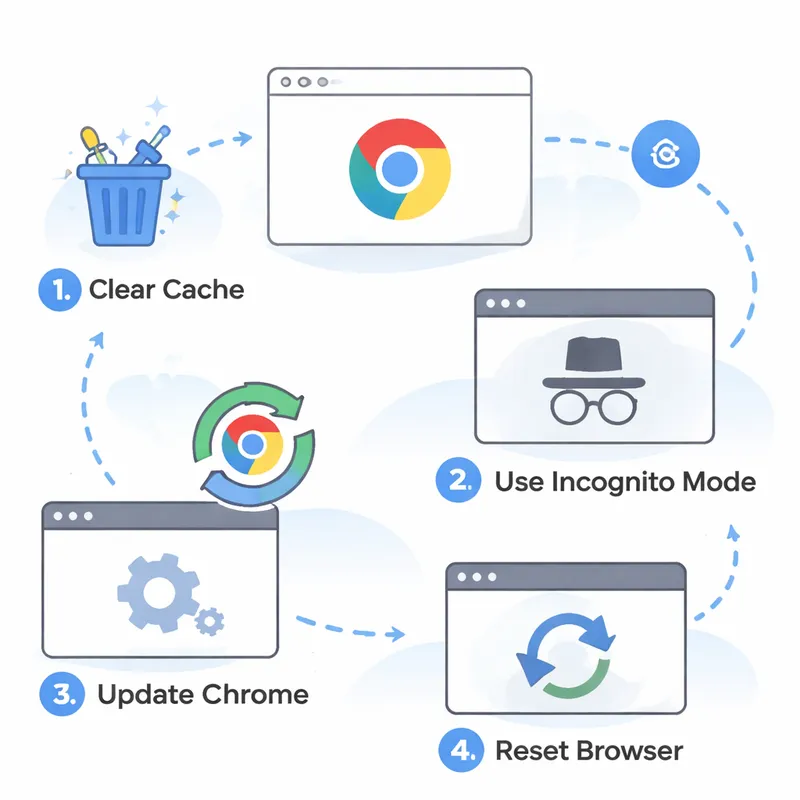
2. Clear the Browsing Data/history
This is one of the most repeated Chrome fixes for a reason.
Go to: Chrome > Settings > Privacy and security > Clear browsing data
Then clear:
- Cached images and files
- Cookies and other site data
If one website keeps failing, clear data for that site first before wiping everything.
3. Disable extensions
Open Chrome extensions and switch them off one by one. Reload the problem site after each change.
Focus on:
- Ad blockers
- VPN extensions
- Script blockers
- Shopping or coupon tools
4. Test Incognito mode
If the site works in Incognito, an extension, cookie, or cached file is likely involved.
5. Update Chrome
Check for the latest browser version. Small updates often fix rendering bugs and broken loading behavior.
6. Restart Chrome and your device
It sounds basic, but weekly browser glitches sometimes disappear after a full restart.
7. Turn hardware acceleration off
Go to: Settings > System > Use hardware acceleration when available
Turn it off, restart Chrome, and test again.
8. Reduce old tabs
If you keep lots of tabs open, close the ones you no longer need. Tab overload can trigger weird reload behavior.
9. Reset Chrome settings
If nothing else works, reset Chrome without uninstalling it.
10. Compare with another browser
If Chrome not loading pages but other browsers do, the problem is probably local to Chrome rather than the website or your connection.
What about Android users?
If your issue sounds like Google Chrome not loading pages Android, try this quick checklist:
- Update Chrome through Google Play
- Restart your phone
- Clear Chrome cache
- Make sure Android System WebView is updated
- Disable Lite or Data Saver style features if active
- Check available storage
- Try the site on mobile data and Wi-Fi
- Remove problem tabs that have been sitting open too long
If some websites not opening in Chrome Android but they load elsewhere, permissions, cached content, or DNS behavior may be part of the problem.
How to restore Chrome back to normal
A lot of people do not want a deep technical fix. They just want Chrome to feel normal again.
Here is the fastest path:
- Clear the Browsing Data/history
- Disable extensions
- Update Chrome
- Reset Chrome settings
- Reopen only the tabs you really need
This will not solve every issue, but it gives you the best shot at getting stable page loading back without wasting an hour.
Is this a website problem or a browser problem?
Here is a simple way to tell.
It is probably a website problem if:
- Only one site fails
- The same page breaks in every browser
- The site is down for other users too
It is probably a browser problem if:
- The page works after repeated refreshes
- Chrome fails but another browser works
- Text is jumbled or images do not load in Chrome only
- Incognito mode fixes it
That distinction matters because people often blame the wrong thing. A broken page does not always mean a broken site.
What this means for the future of browsing
As Chrome keeps blending search, suggestions, account sync, and site access into one entry point, your browser becomes less like a neutral window and more like an active layer between you and the open web.
That does not mean websites are going away. It does mean the first version of a page you see may increasingly depend on how Chrome decides to fetch, cache, predict, restore, and render it.
So yes, websites may never load like before. For some users, that means faster and smoother. For others, it means you hit refresh three times and wonder what happened to the old internet.
FAQ
How to fix Google not loading websites?
Start with a hard refresh, then Clear the Browsing Data/history in Chrome. After that, disable extensions, update Chrome, restart your device, and test the page in Incognito mode. If Chrome not loading pages but other browsers do, reset Chrome settings and check hardware acceleration.
How do I restore Google back to normal?
If by “Google” you mean Chrome or Google Search acting strangely, clear cache and cookies, disable extensions, reset Chrome settings, and make sure your default search engine and homepage are set the way you want. On Android, also update Chrome and Android System WebView.
How do I get my Google search bar back to normal?
Check whether your default search engine changed, remove any suspicious extensions, and reset Chrome settings. If the address bar looks different after an update, you may also need to review Chrome flags, toolbar customizations, or mobile launcher settings on Android.
Is Google Sites no longer free?
Google Sites are free to build, host, and maintain with a Google or Gmail account. There are no web hosting fees. If, however, you are using Google Sites in conjunction with Google Workspace, the cost is rolled into the user license fee of all plans.

