Nginx UI CVE-2026-33032: why this active exploitation matters right now
Nginx UI CVE-2026-33032 is now tied to active exploitation in 2026, and that should change your response speed. This is not a theoretical bug. It is an exploited authentication bypass in nginx-ui, a web-based UI for managing Nginx. If your team uses nginx-ui with MCP enabled, you should assume attackers may already be probing it.
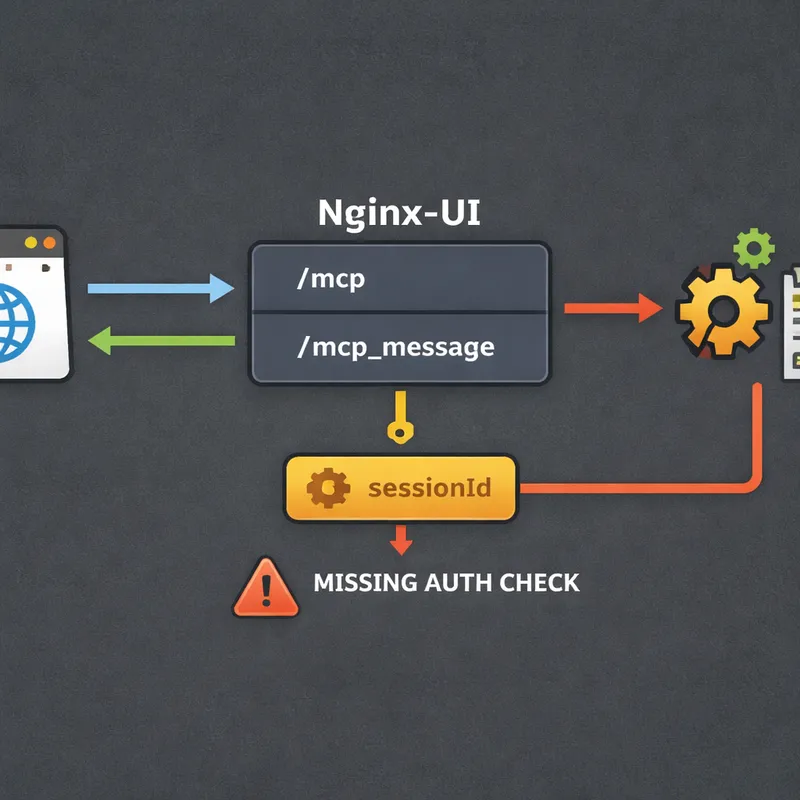
The issue sits in the MCP integration. One endpoint, /mcp, uses IP filtering and authentication. The paired endpoint, /mcp_message, was missing the authentication middleware. On top of that, the default IP whitelist can act like allow-all when left empty. That means an attacker who can reach the service may be able to invoke powerful MCP tools and take over the Nginx service.
The fix is available in nginx-ui v2.3.4. If you are still on v2.3.3 or earlier and MCP is enabled, this is urgent.

What CVE-2026-33032 is and why attackers care
CVE-2026-33032, also called MCPwn, is a critical authentication bypass in nginx-ui's Model Context Protocol integration. It carries a CVSS score of 9.8 and affects nginx-ui versions up to 2.3.3 when MCP is enabled.
What makes this bug dangerous is simple. The vulnerable endpoint can perform real server actions, not just read-only queries. According to public research, attackers can use MCP tools to:
- create or modify Nginx configuration files
- enable or rename configs
- reload or restart Nginx
- read configuration history and status
- map backend services and internal topology
In practice, that can lead to full Nginx service takeover. An attacker may also redirect traffic, harvest credentials, capture headers, or break the service by pushing bad config and forcing a reload.
How the exploit works at a high level
You do not need exploit code to understand the risk. The high-level flow is enough for incident response.
Researchers described a fast attack path built around two MCP endpoints:
GET /mcpcreates an SSE session and returns asessionIdPOST /mcp_message?sessionId=...invokes MCP tools
The design problem is that /mcp_message was shipped without the AuthRequired() middleware, even though it reaches the same sensitive tool handler. So the control that should protect destructive actions is missing where it matters most.
There is one wrinkle. Creating the session typically requires a node_secret. Researchers noted attackers may obtain that secret by chaining another nginx-ui flaw, CVE-2026-27944, which can expose backup decryption keys and sensitive data through /api/backup on older versions. That data may include user credentials, SSL private keys, Nginx configs, and the node_secret needed to open the MCP session.
Other environments have a different risk. If an attacker already has internal or container-level access, they may find node_secret in environment variables, Docker Compose files, or Kubernetes secrets.
That is why this vulnerability is so serious. Even if the attack path sounds short, it fits real-world breach patterns.
Why /mcp_message became the weak spot
This bug is a good example of how small security gaps create huge consequences.
Here is the core mismatch:
/mcphad IP whitelisting plus authentication/mcp_messagehad IP whitelisting only- empty IP whitelist behavior could allow all traffic by default
So a deployment could look protected on paper while still exposing the action endpoint. That is the part teams often miss during review.
There is also a bigger lesson here. When MCP gets bolted onto an existing app, the new endpoints may inherit powerful capabilities without inheriting the same security controls. In plain English, the app can accidentally grow a backdoor path to trusted actions.
What to check immediately in your environment
If you own or defend nginx-ui, start with a fast triage list.
1. Check your nginx-ui version
Prioritize any instance running:
- nginx-ui 2.3.3 or earlier
- MCP enabled
- management interface exposed to untrusted networks
If you are on v2.3.4 or later, verify the upgrade really completed everywhere. I would not assume one successful patch job means your whole fleet is clean.
2. Check whether MCP is enabled
If your team does not actively use MCP, disable it. This is the quickest risk reduction step when patching is delayed.
3. Check network exposure
Look for nginx-ui instances reachable from the internet, especially on port 9000. Public reporting linked thousands of exposed instances to Shodan results. If your admin UI is public, your risk is higher right away.
4. Review the IP whitelist configuration
Do not leave the IP allowlist empty. In vulnerable builds, empty may behave like allow-all. Confirm that only approved operator IPs can reach the management interface and MCP endpoints.
5. Hunt for suspicious requests
Look for these patterns in web, reverse proxy, and WAF logs:
- unexpected
GET /mcp?node_secret=... - any
POST /mcp_messagefrom unusual IPs - long-lived SSE connections to
/mcp - activity outside your normal admin change window
6. Review config directories for unauthorized change
Inspect common Nginx paths managed by nginx-ui, such as:
conf.d/sites-enabled/sites-available/
Focus on newly created files, renamed files, changed upstreams, suspicious proxy_pass targets, and odd redirects.
7. Inspect log settings for credential capture
Attackers may abuse log_format or access_log directives to record sensitive request data. That can include Authorization headers, cookies, or other request metadata.
8. Check nginx-ui change history and reload events
Look for:
- unexpected configuration history entries
- Nginx reloads or restarts with no approved ticket
- service interruptions after config changes
9. Review identity signals
Check for:
- admin logins from new IPs or user-agents
- suspicious JWT timing values such as odd
iator long-livedexp - tokens that remain valid after expected secret rotation
Signs you may already be exploited
If attackers used CVE-2026-33032 successfully, the impact may go beyond a changed config file.
Watch for these concrete indicators:
- upstream traffic suddenly routing through unknown hosts
- new reverse proxy rules that mirror or redirect traffic
- TLS or SSL material accessed or exported unexpectedly
- admin credentials used from abnormal locations
- modified logging rules designed to capture headers or cookies
- forged JWT behavior or suspicious persistence after rollback
- internal services exposed in configs that should not be visible to the attacker
- Nginx outages caused by invalid config injection and forced reloads
If you find any of that, treat the host as compromised, not just misconfigured.
How to respond to CVE-2026-33032 step by step
Step 1: Patch nginx-ui immediately
Upgrade to nginx-ui v2.3.4 or later. The fix adds the missing authentication middleware to /mcp_message and includes a regression test so both MCP endpoints reject unauthenticated requests.
Step 2: Disable MCP if you do not need it
If your team is not actively relying on MCP, turn it off. That removes the vulnerable feature path while you validate the rest of your environment.
Step 3: Restrict access to the management interface
Do not expose nginx-ui to the public internet. Put it behind:
- VPN access
- jump hosts
- private networks
- strict firewall rules
- explicit IP allowlists
Step 4: Rotate sensitive secrets
If exploitation is confirmed or even strongly suspected, rotate:
- nginx-ui
JwtSecret - nginx-ui user credentials
node_secret- SSL private keys managed in the platform
- credentials for upstream apps behind Nginx
This matters because an attacker may have intercepted traffic or extracted secrets from backups and settings.
Step 5: Audit and restore Nginx configs carefully
Compare live configs against known-good baselines. Do not just roll back blindly. You need to identify whether attackers added persistence, credential logging, or traffic interception rules.
Step 6: Review backups and secret storage
Because CVE-2026-27944 may expose material used to support this chain, inspect backup handling and any place where node_secret or related secrets are stored.
Step 7: Increase monitoring for repeat access
After patching, keep a close watch on /mcp, /mcp_message, admin logins, and Nginx reload patterns. Attackers often come back if they already harvested valid credentials.
A practical response checklist for SecOps and infrastructure teams
Use this quick checklist if you need a short action plan:
- identify every nginx-ui instance
- flag versions 2.3.3 and earlier
- verify whether MCP is enabled
- upgrade to v2.3.4+
- disable MCP where unnecessary
- remove public exposure on port 9000
- set a non-empty IP allowlist
- review
/mcpand/mcp_messagelogs - inspect config directories for tampering
- rotate
node_secret, JWT secrets, passwords, and keys if compromise is suspected - review change history, restarts, and reloads
- monitor for unusual admin activity and forged tokens

Why this bug matters beyond nginx-ui
CVE-2026-33032 is also a design warning.
Many teams are adding MCP features fast. That is useful, but it changes the attack surface. The mistake here was not a fancy memory corruption bug. It was a missing middleware call on a critical function. One skipped security check turned a management feature into an attacker path.
That is why your review process should cover more than code quality. You also need to verify that every new endpoint inherits the same auth, authorization, network policy, and test coverage as the older app paths.
In my view, that is the real takeaway. Small integration mistakes around AI or MCP features can carry full admin power.
FAQ
What is CVE-2026-33032?
CVE-2026-33032 is a critical authentication bypass in nginx-ui's MCP integration. It allows attackers to reach sensitive MCP tool actions through the /mcp_message endpoint without the expected authentication controls.
Is CVE-2026-33032 being actively exploited?
Yes. Multiple security reports have described CVE-2026-33032 as actively exploited in the wild in 2026, and it has been highlighted by threat intelligence tracking sources as a priority issue.
Which nginx-ui versions are affected?
Public reporting points to nginx-ui versions up to 2.3.3 as vulnerable when MCP is enabled. Version 2.3.4 contains the fix.
What is MCPwn?
MCPwn is the nickname given to this vulnerability by researchers. It refers to the way nginx-ui's MCP integration can be abused to gain control over Nginx management functions.
What can an attacker do with this exploit?
An attacker may create, modify, enable, or rename Nginx configs, reload or restart Nginx, inspect configuration data, map internal services, intercept traffic, and potentially capture credentials.
Does the attacker need authentication?
The vulnerable /mcp_message endpoint was missing the required authentication middleware. In some attack paths, the attacker still needs a valid sessionId, which can be created using node_secret. Researchers noted that node_secret may be obtained through CVE-2026-27944 or from internal secret storage in already compromised environments.
How do I know if my system was targeted?
Review logs for unusual GET /mcp?node_secret=... requests, unexpected POST /mcp_message activity, long-lived SSE sessions, unapproved config changes, suspicious reloads, and admin access from unfamiliar IP addresses or user-agents.
What should I do first?
Patch to nginx-ui v2.3.4 or later right away. If patching is not possible today, disable MCP and lock down network access to the management interface.
Should I rotate secrets after exploitation?
Yes. If compromise is suspected, rotate node_secret, JWT secrets, user credentials, SSL private keys, and any upstream credentials that may have been exposed through traffic interception or config abuse.
Is restricting public access still necessary after patching?
Yes. Even after patching, your nginx-ui management interface should not be broadly reachable from the internet. Administrative surfaces should sit behind strong network controls.
Final takeaway
If you run nginx-ui, treat CVE-2026-33032 as an immediate operational issue, not just another CVE in the feed. Active exploitation means your response window is short. Patch to v2.3.4+, disable MCP if you do not need it, restrict access, and review configs, logs, and secrets as if an attacker may already have touched the box.
That sounds strict, but with a bug that can hand over your web server, strict is the right call.

